
Skills Analysis
Skills analysis compares what each role requires with what your people hold. Look at the whole organisation, one team or one position. It's the first screen you see when you open WFI.
Use the Organization / Team / Position switch at the top to change scope, and Framework / Market to change what people are measured against. See Framework and Market.
Organization
Headline figures
People mapped to a position: people who could be measured, with a count of those without a position. On Market, it counts people in a role matched to the market.
People below requirement: people short on at least one required skill.
People meeting every requirement: people at or above the required level on every skill.
Critical skills: skills at the highest level of key-person risk. Select it to open Key-person risk. This figure always uses your framework and the risk rule you've set on that screen.
Teams at a glance
One card per team, weakest first. Each card shows the team's average requirements met score and its biggest gap. Select a card to open that team.
Skills across the org
Every skill required by your positions, with Have (people whose role needs it and who hold it at any level) and Missing (people whose role needs it but who don't have it). Sort by Most held, Most missing, A–Z or Z–A.
Select a skill to see its distribution. In Chart view each dot is a person, coloured by whether they're at or above the level their role needs, below it, or missing the skill. List view shows the same people, lowest first. Select a person to open their profile.
People
Ranks people by their skill gaps or strengths. Choose Biggest gaps or Top performers, then what to rank by:
Biggest gaps: Total gap, Deepest gap or Most gaps.
Top performers: Total surplus, Biggest strength or Most skills.
Each bar is made of one band per skill. Hover over a band to see the skill.
Good to know
Top performers means people furthest above their role's requirements. It doesn't measure job performance.
Team
Pick a team. The summary shows its people, its skills, and how many skills the team is ahead of requirement on, on average.
[Team] — skills: the same skill list and distribution as the Organization view, for this team.
Roles in [Team]: one card per role someone in the team holds, with its requirements met score and its top gaps. Select a card to open that position.
Position
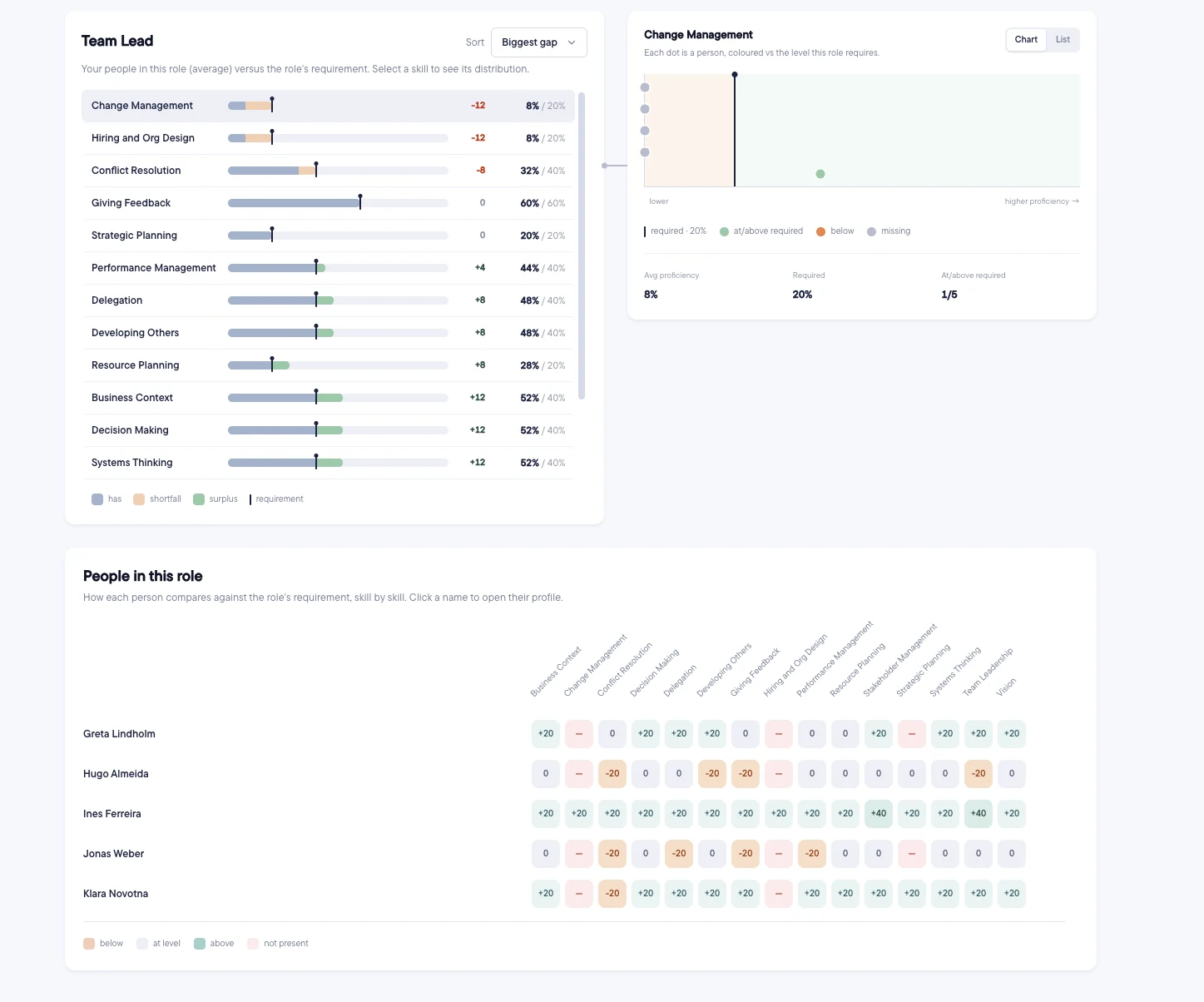
Pick a position. You'll see:
The skill list: the average level of the people in this role against the requirement, biggest gap first. People who don't have a skill count as zero in the average.
The distribution: each person against the required level for the selected skill, with the average and how many are at or above it.
People in this role: a grid of each person against each skill, coloured below, at level, above or not present. Select a name to open their profile.
Frequently asked questions
Why does a role show "No requirements set for this role yet"?
Add required skills and levels to the position in its framework, then refresh the analysis.
Why do the team's people count and its score disagree after a change?
Counts of people are live, but scores come from the last analysis. Select Refresh analysis to bring them in line.